Laboratory information management for NABL testing laboratories

From the client's letter to the signed report and the paid invoice, in one system.

GenLIMS replaces the booking register, the Word report formats, the billing package and the shelf of quality files. The letter becomes the booking, the booking becomes the report, the report becomes the invoice, and the ISO/IEC 17025 registers fill as the work happens.

95modules described in this prospectus
35ISO/IEC 17025 clause points tracked live
21quality registers with signed PDF export
2Android apps: field staff and owner
demo.genlims.in/superadmin/dashboard
GenLIMS dashboard with invoice and payment chart, GST overview, customers overview and bookings by marketing person
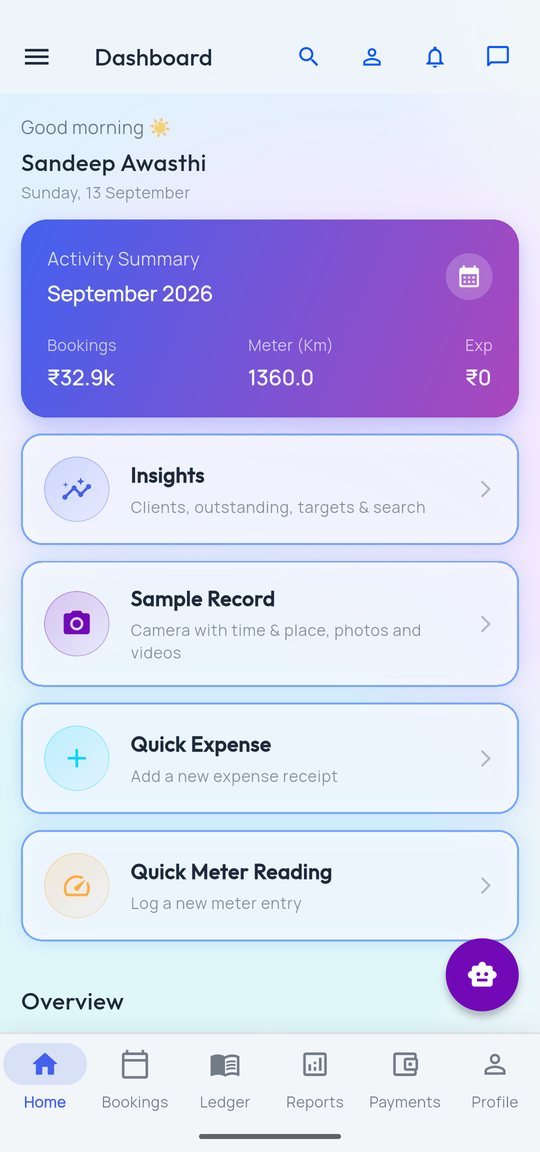
Field app home screen
How work flows

One chain, entered once

Every step points back at the one before it. Nothing is retyped: the client and the job order are entered in one place and carried all the way to the ledgers. Click a step, or use the arrows.

Module directory

Every module, in seven areas of the lab

Click an area to filter, search by name, or open any module to read what it does. Modules marked screen open with a real screenshot from the demo panel.

Number of modules per area. Click a bar to filter the list.

modules in all
open with a real screenshot
shown in the list
Screenshot of the module under the pointer
ISO/IEC 17025:2017 · NABL

The NABL file builds itself as the lab works

The NABL Roadmap inside the panel lists all 35 clause points the software covers, each with its register, its record count and where the evidence lives. Click a clause to see which module keeps it.

33 of 35 available
Available 33Partial 2Coming soon 0
Clause points tracked35
Quality registers21
Export of each registerPDF + Excel
Record countsLive
Click a clause to see the module that keeps its records.

Registers your assessor asks for

Each quality register numbers its own entries, keeps who changed what, and exports a signed PDF or Excel copy for the assessment file. Registers can be renamed, re-prefixed or switched off to match the lab's own quality manual.

  • CAPA, complaints, nonconforming work and internal audits linked to each other
  • Equipment, calibration certificates and intermediate checks with due-date colours
  • Competence matrix, environment log, PT / ILC with z-scores, MU budgets
  • Management review with all fifteen inputs and tracked actions
demo.genlims.in/superadmin/nabl-roadmap
NABL Control Panel listing clause points with status

Stated plainly: GenLIMS keeps a laboratory's records complete and consistent. It does not by itself make a laboratory accredited; the work still has to be done correctly by qualified people.

Testing and reports

Reports made on the lab's own formats

The lab's existing Word formats are imported once. Analysts fill readings in the Report Canvas, results are checked against the limits as they type, and the ULR number is allotted from the NABL series when the report is issued.

GenLIMS AI

The assistant reads, checks and answers

Three jobs where the AI saves the most typing and catches the most mistakes. Every result is shown to a person before anything is saved.

Accounts, GST and ledgers

Every booking knows if it is billed and if it is paid

Invoices are made from the bookings, with GST, TDS, e-invoice IRN, credit and debit notes. The company ledger opens down to the single sample behind any figure. Try it: click through the four levels.

People, stores and operations

The rest of the office, on the same login

Staff, attendance, payroll, stock, vehicles and meetings run on the same data and the same permissions as the lab work.

Two Android apps

The lab in the pocket of the field team and the owner

Both apps work on the same data as the panel. Tap the screen names to look through each app.

Installed from the panel

Each app has its own page in the panel with a QR code and download link. No app store needed for the lab's own staff.

Updates itself

When a new version is placed on the panel, the apps offer the update on the next launch.

Same permissions

A person sees in the app only what their role allows on the web. Marketing persons see only their own letters and ledger.

Client Website add-on

A public website for the lab, run from the panel

Six ready designs, the lab's own colours, services, accreditation, gallery and contact, plus any number of custom pages with menu and SEO control. Published at the lab's own address.

demo.genlims.in/superadmin/website
Lab Website settings with six design choices
demo.genlims.in/site
Public website of the demo laboratory
Deployment and licence

Your lab's name on every page

GenLIMS is white-label. The lab's name, logo, letterhead, GSTIN, bank details and invoice series appear on every report, invoice, quotation and voucher.

Cloud

We host it at the lab's own web address and keep it updated. Nothing to install; staff sign in from any browser.

On the lab's server

Installed on the lab's own server. A signed licence file works offline, so the software does not need to call us to run.

Pay for what you use

The licence switches modules on one by one. Start with booking, reports and accounts; add quality registers, HR or the website later.

Try it yourself

Open the demo laboratory

The demo holds about a year of made-up laboratory data across every module. It resets every night, so change anything you like.