It reads the client's letter, and it reads your report before the client does.
Two jobs that used to take a person's full attention. GenLIMS turns a scanned letter into a filled booking form, sample by sample — and reads every test report that is uploaded, flagging a missing reading, an impossible value or a test outside your accredited scope before the report leaves the lab. A person still confirms the booking and still signs the report.
A letter with eleven samples is about sixty fields typed by hand, and every one of them is a chance to mistype a reference number, a grade or a quantity — mistakes that travel on to the report and the bill. Here the letter is read, not typed.
Step 1 — upload and read
Attach the letter; it reads every line
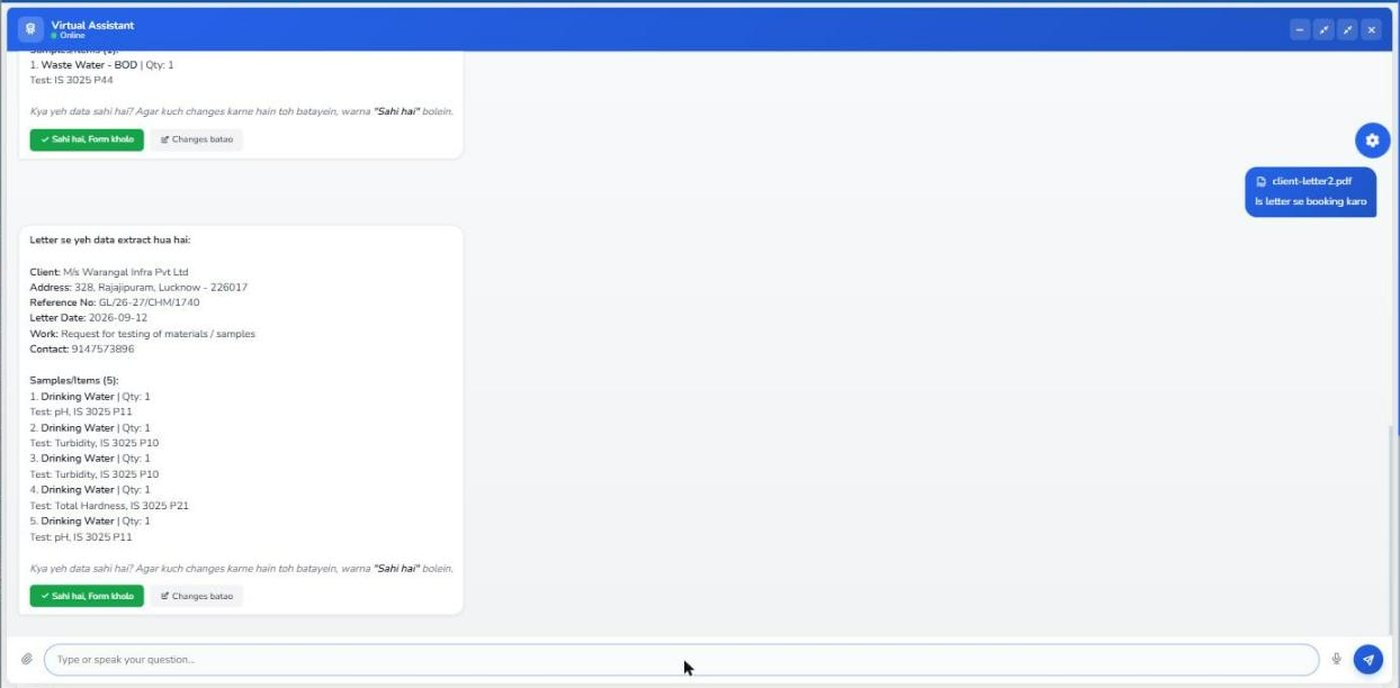
On the New Booking page, open the assistant, attach the letter exactly as it came — a PDF, a scan or a photograph from the phone — and ask it to book. In a few seconds it shows back what it understood.
The letter you uploaded — the same file you would have filed anyway.
The letter's details — client, address, reference number, letter date, name of work and contact.
Every sample, numbered, with its quantity and the test and IS method asked for.
Confirm or correct — open the form with this data, or tell it in plain words what to change.
1234A demo letter from M/s Warangal Infra with five water samples, read back in full.
Step 2 — the form fills itself
The booking form opens already filled
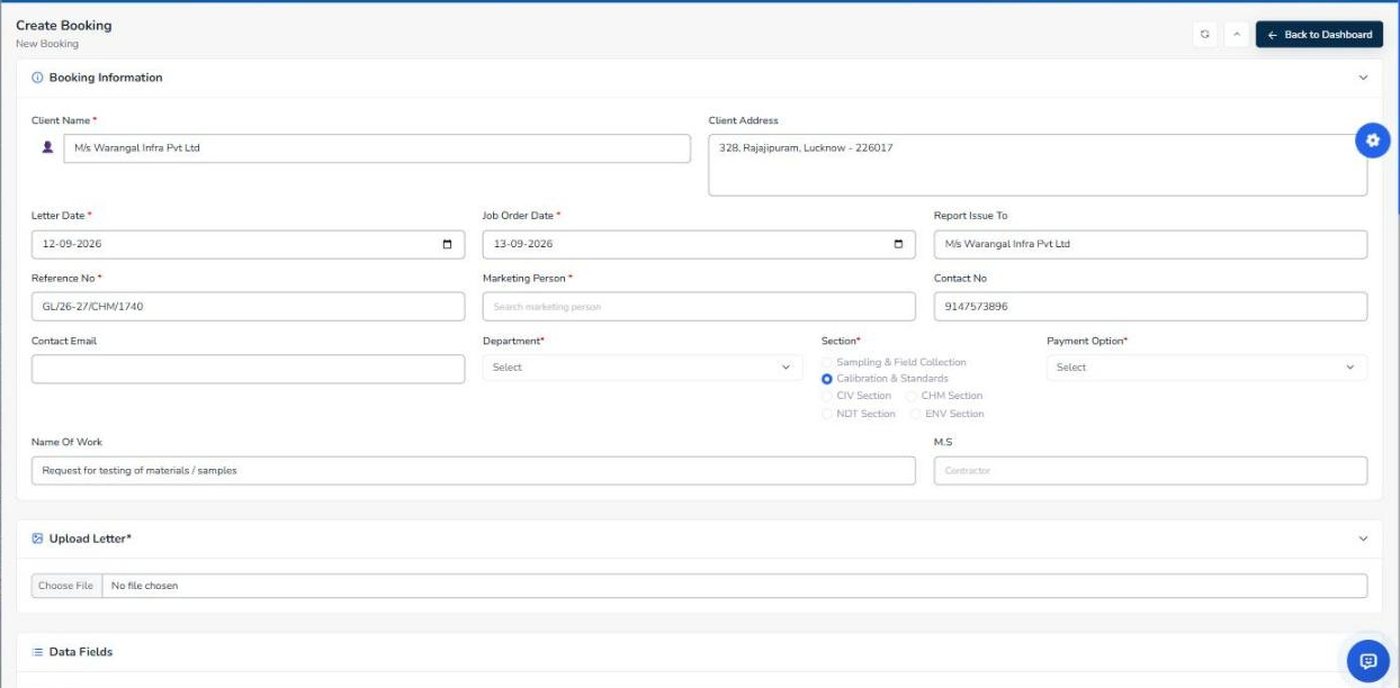
Press confirm and the ordinary New Booking form opens with the letter's details in place. Nothing is saved yet — it is the same form a person would have typed into, so every rule of a normal booking still applies.
Client and address, copied in the client's own wording.
Reference number and letter date — the two fields most often mistyped.
Contact number and who the report is issued to.
Left for you: marketing person, department and payment option — decisions a letter cannot make.
1234The New Booking form after confirming — the header is filled; the office's choices are still blank.
Step 3 — sample by sample
Each sample lands in its own row
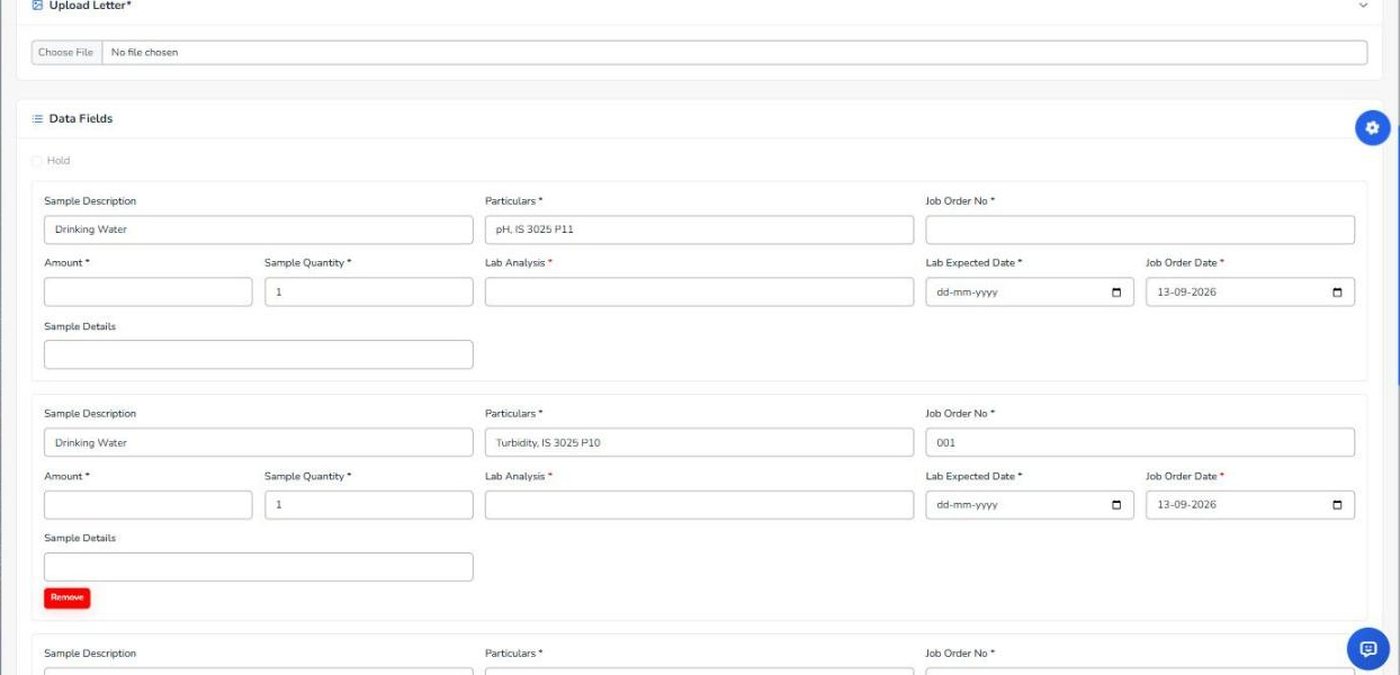
The first sample fills the first row. A Fill Next Sample button adds the next row and fills it — the job order number is issued by the software as usual — until the counter reads "All 5 samples filled".
Sample description exactly as the client wrote it — which matters, because report formats are matched on these words.
Particulars: the test and the IS method.
Quantity as stated in the letter.
The next sample, in the next row, with its job order number.
Amount, analyst and expected date stay with the office. Press Submit and the job cards print as they would for a hand-typed booking.
1234Rows one and two filled from the letter; the counter button fills the rest.
What it reads out of a letter
From the demo letter shown above — M/s Warangal Infra's request for five water tests. Try the same with any letter of your own in the demo.
It finds
From that letter
Client and address
M/s Warangal Infra Pvt Ltd, 328 Rajajipuram, Lucknow – 226017
A report with a blank reading, a value typed into the wrong column, or an IS code the lab is not accredited for is the kind of mistake a tired eye skims past — and the kind an assessor or a client finds. When a report PDF is uploaded, GenLIMS reads it against the method, the limits and your own accreditation scope, and says what it found.
Step 1 — upload the report
Upload as usual; the check starts on its own
Nothing new to learn: the report is uploaded on Received Reports exactly as before. A check is queued, and a badge appears in the AI Report Review panel for that letter within moments.
Upload Report — the normal upload, optionally compressed.
The verdict badge: clean, a number of corrections, or — as here — a scope violation.
View in PDF opens the report with every finding pinned to its page; Open Discussion lets you ask about a finding in plain words.
123The review panel on Received Reports after a cement report was uploaded.
Step 2 — read the findings
Each finding says what was expected and what was found
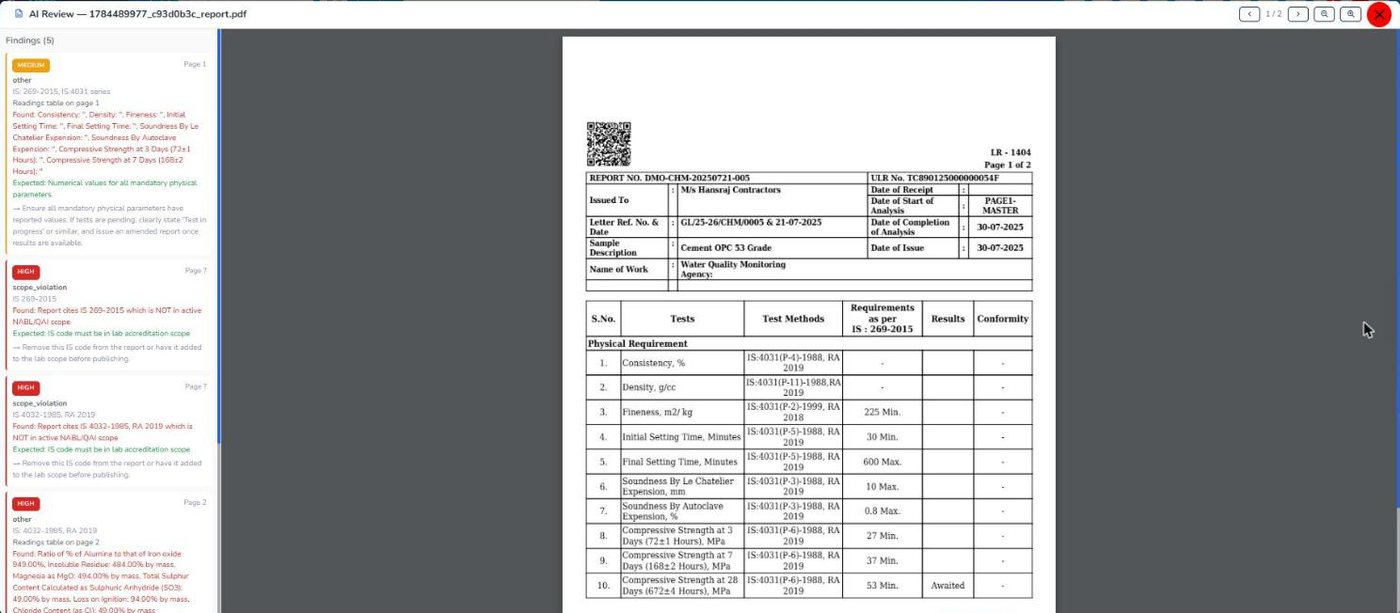
The report opens beside a list of findings, highest severity first. Each one names its page, the IS code involved, what the standard expects, what the report actually says, and a suggested correction. This is the review of the cement report above — a real run on the demo:
Medium — readings missing. Consistency, density, fineness and setting times have no value in the Results column.
High — outside scope. The report cites IS 269:2015 and IS 4032:1985, which are not in the lab's active NABL/QAI scope.
High — a value that cannot be right. Alumina-to-iron-oxide ratio typed as 949.00 against a limit of 0.66 minimum — and marked as conforming.
The report itself, so each finding can be checked against the page it points to.
1234Five findings on a two-page cement report, with the report open on the right.
What it catches
Every one of these came from a report that looked finished.
High
A test outside your accredited scope
The IS codes on the report are compared with your own NABL/QAI scope register, so a non-accredited test is not reported under the accreditation.
Report cites IS 4032-1985, RA 2019 which is NOT in active scope
High
A value that cannot be right
A reading far outside what the material can physically give — usually a decimal point lost or a number typed into the wrong row.
Insoluble residue: 484.00 % by mass
High
Conformity that contradicts the value
The pass/fail column is checked against the observed value and the limit printed beside it.
Observed 949.00 · Limit 0.66 Min · Status: Yes
Medium
Mandatory readings left blank
Required parameters with no result — a report issued before the test was complete, or rows forgotten when the format was filled.
Consistency: '' · Density: '' · Fineness: ''
Before dispatch
An unresolved high-severity finding holds the report at dispatch until someone deals with it.
It learns
A finding that is genuinely wrong is dismissed with a reason, and the software stops raising that pattern.
Already checked
A report identical to one already found clean is marked as a cached clean match, without a second read.
A record
Every check, finding, dismissal and override is kept with who did it and when — useful evidence under clause 7.8.
Part three
The same assistant, elsewhere in the software
Ask your own data
"Which reports are pending for more than a week?" "How much has M/s Warangal Infra paid this year?" — answered from the lab's records, in English or Hindi, by voice or typing.
Quotation from a letter
An enquiry letter becomes a filled quotation form in the same way a booking does — reviewed and saved by a person.
On the phone
Both Android apps carry the same assistant, so the owner and the marketing team can ask about bookings, pending reports and payments from anywhere.
What the AI does
Reads a letter and fills the booking or quotation form
Reads an uploaded report and lists what looks wrong
Answers questions from the lab's own records
What stays with people
It never submits a booking — a person presses Submit
It never signs or issues a report — it is a second pair of eyes, not a signature
An admin decides who may use it, sets a daily limit per person, and can read the log of every request
Upload a letter in the demo and watch it fill the form.
Open New Booking, open the assistant from the button at the bottom right, attach any client letter and ask it to book.